An it security protocols checklist Template is most useful when it turns broad security expectations into specific, reviewable controls. Instead of relying on memory or informal checks, a structured checklist gives an IT team a repeatable way to verify identities, devices, software, configurations, data protection, monitoring, incident response, recovery, and governance. The strongest checklists also record ownership, evidence, review dates, exceptions, priorities, and remediation status. This makes the document useful not only during an audit, but throughout the security lifecycle.
Current cybersecurity guidance supports this control-oriented approach. NIST Cybersecurity Framework 2.0 organizes cybersecurity outcomes into Govern, Identify, Protect, Detect, Respond, and Recover, while the CIS Controls provide a prioritized set of safeguards covering assets, software, data, configuration, accounts, access, vulnerabilities, logs, recovery, training, service providers, network defense, and incident response. A checklist should translate those concepts into organization-specific verification tasks rather than treating any framework as a universal one-size-fits-all list.
The practical objective is therefore not to create the longest possible checklist. It is to create one that is specific enough to test, measurable enough to track, and flexible enough to reflect actual business risk. A small office, cloud-native company, university, manufacturer, and regulated enterprise may all need different checks even when they use the same security principles. The sections below show how to build a useful template, what to include, how to select formats, and how to operate the checklist as part of a continuous security program.

What an IT security protocols checklist should accomplish
A good checklist establishes a common definition of what “checked” means. Each control should identify the condition being verified, the expected state, the evidence that demonstrates compliance, the person responsible, and the action required when the expected state is not present. For example, “MFA is enabled” is less useful than “MFA is enabled for administrative accounts, remote access, and other designated high-risk services; configuration evidence was reviewed on the assessment date.” The second wording creates a testable control.
The checklist should also distinguish between policy, configuration, operation, and evidence. A written password policy does not prove that account settings enforce the policy. A backup procedure does not prove that backups succeed. A vulnerability-management policy does not prove that identified weaknesses are remediated. Separating these layers helps reviewers avoid giving credit merely because documentation exists.
Another important function is accountability. Every material control should have an owner or responsible role, even when the actual task is performed by a service provider. Ownership makes overdue items visible and prevents security observations from becoming permanent notes with no follow-up. A mature checklist can therefore act as a lightweight control register, connecting technical verification with management decisions and remediation planning.
Use a recognized framework as the checklist backbone
NIST CSF 2.0 is particularly useful for organizing an IT security protocols checklist because its six Functions provide a broad lifecycle view. Govern addresses strategy, policy, roles, oversight, and supply-chain risk. Identify addresses assets, suppliers, risks, and improvements. Protect covers safeguards such as identity, authentication, access control, awareness, data security, platform security, and infrastructure resilience. Detect, Respond, and Recover address monitoring, incident handling, mitigation, restoration, and recovery communication.
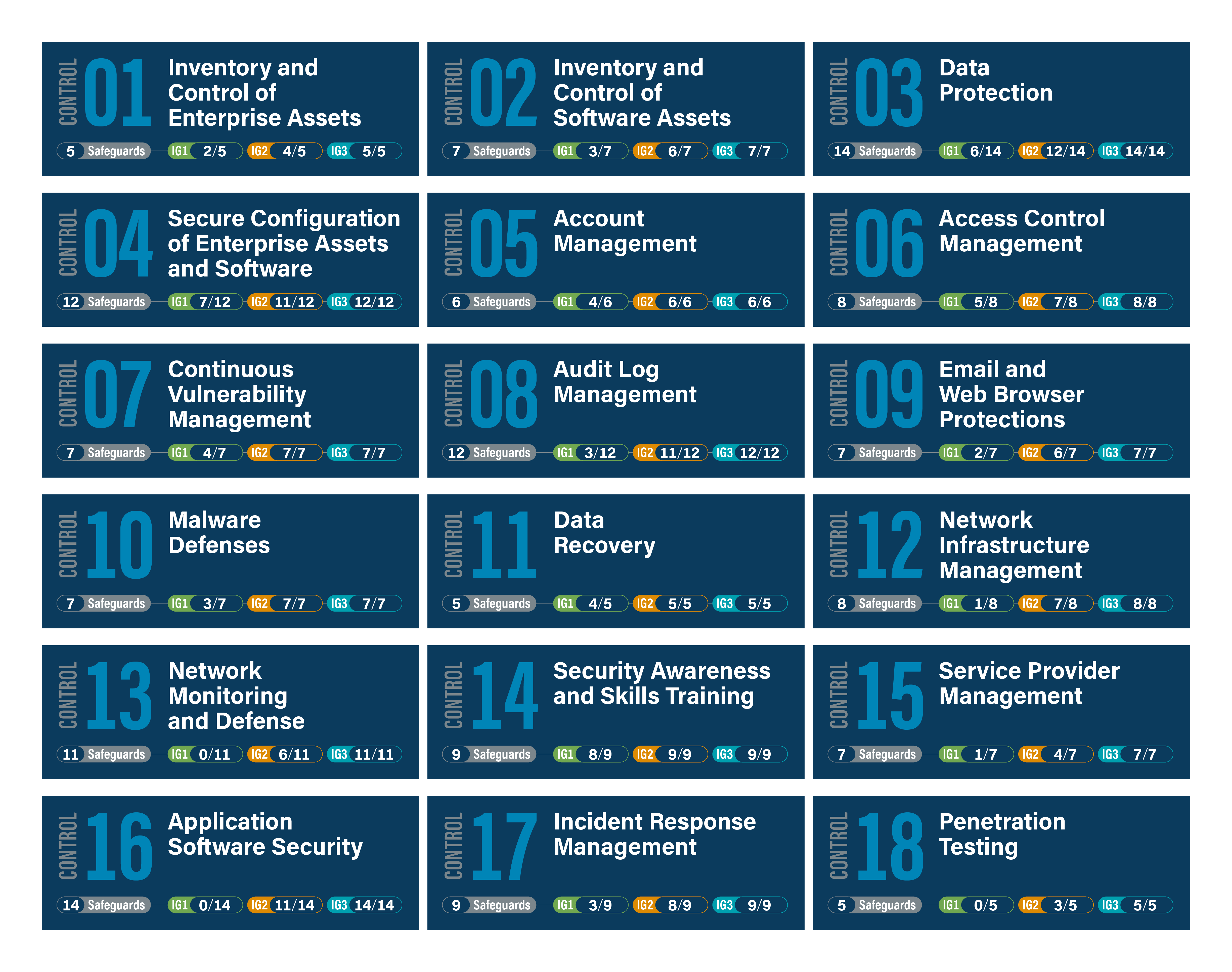
The CIS Controls provide a more prescriptive structure for organizations that want concrete technical and operational checks. Their control areas include enterprise and software inventories, data protection, secure configuration, account management, access control, continuous vulnerability management, audit logs, email and browser protection, malware defenses, data recovery, network infrastructure, network monitoring, awareness training, service providers, application security, incident response, and penetration testing. These controls can help turn high-level outcomes into individual checklist items.
Neither framework should simply be copied without tailoring. NIST explicitly describes its CSF Core as a taxonomy of outcomes rather than a mandatory sequence of actions, while CIS emphasizes prioritized safeguards. Your checklist should reflect the technologies, data, business processes, suppliers, regulatory environment, threat exposure, and risk tolerance of the organization being assessed. That distinction is essential because a checklist is an operational instrument, not a substitute for risk analysis.

Core sections to include in the checklist
Governance, policy, and ownership
The first section should establish whether security responsibilities are formally assigned. Check for an approved security policy, defined roles, management oversight, documented exceptions, review schedules, risk ownership, and a process for escalating unresolved issues. The checklist should also identify who can approve risk acceptance and who is responsible for ensuring remediation is completed.
Policy checks should be connected to operational evidence. If a policy requires periodic access reviews, the reviewer should be able to locate completed reviews. If the organization requires security incident reporting, the checklist should verify that personnel know the reporting route and that incident records exist where appropriate. This approach prevents a document-heavy security program from receiving a stronger assessment than its actual practices justify.
A governance section can also capture third-party responsibilities. Cloud providers, managed service providers, software vendors, contractors, and other suppliers may hold or process important information. The checklist should verify that supplier security requirements are defined, relevant contracts are reviewed, responsibilities are understood, and significant third-party risks are tracked.
Asset and software inventory
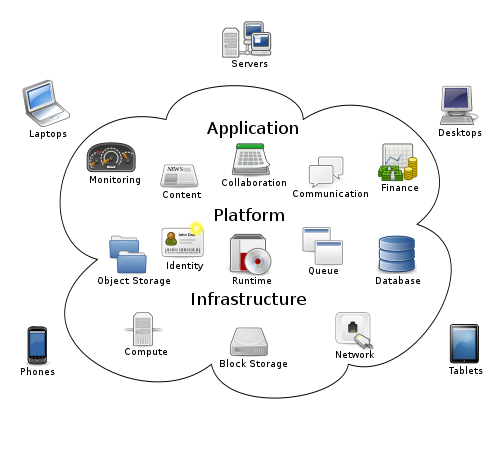
You cannot reliably protect systems that are not known to the organization. Asset checks should cover workstations, laptops, servers, network equipment, virtual machines, mobile devices, cloud resources, Internet-connected devices, and other relevant technology. Useful fields include asset owner, business function, location or environment, criticality, operating status, and lifecycle state.
Software inventory deserves separate attention. The checklist should identify operating systems, applications, libraries, services, scripts, and other software that can affect the attack surface. Reviewers should look for unsupported software, unauthorized installations, inconsistent versions, and systems that are missing from the organization’s inventory process.
A practical template should also provide a way to record exceptions. If an older system cannot be upgraded immediately, the record should describe why it remains in service, who accepted the risk, what compensating controls exist, and when the exception will be reviewed. This creates a more useful picture than a simple yes-or-no checkbox.
Identity, authentication, and access control
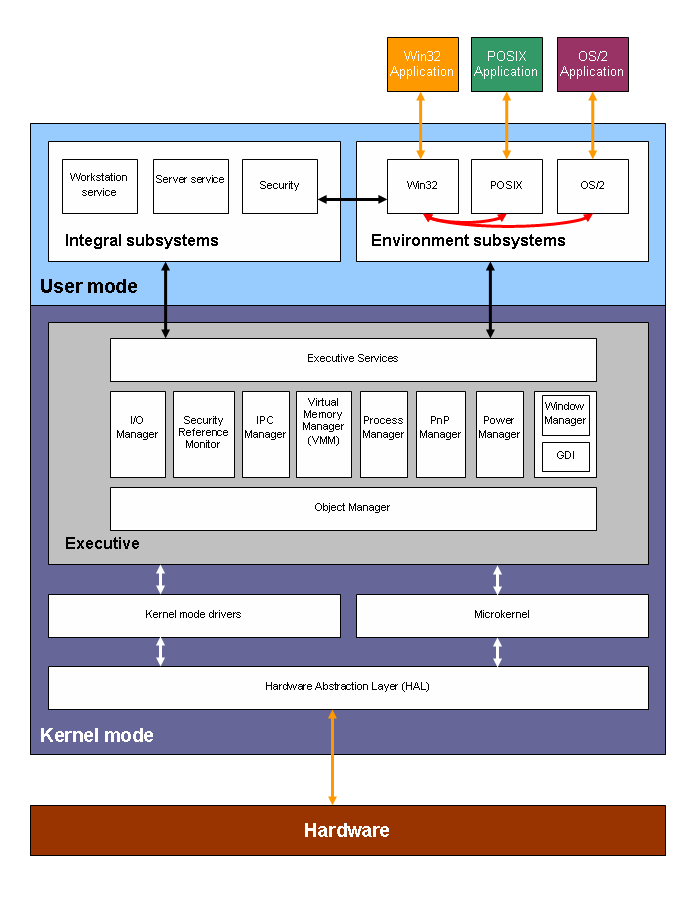
Identity controls are usually among the highest-value sections of an IT security protocols checklist. Verify unique accounts, appropriate authentication methods, multi-factor authentication where required, secure credential handling, privileged-account separation, account lifecycle processes, and periodic access reviews. The checklist should distinguish ordinary user access from administrative access because privileged identities can carry substantially greater impact.
Least privilege should be tested against actual permissions rather than simply recorded as a policy statement. Review whether users, administrators, service accounts, and external identities receive only the access needed for their responsibilities. Role-based access control can make this easier to manage because permissions are associated with defined roles rather than individually maintained wherever possible.
Account lifecycle checks should cover onboarding, role changes, leave periods where relevant, termination, dormant accounts, service accounts, and emergency access. A strong control record states who approves access, how approval is documented, how quickly access changes occur, and how the organization verifies that obsolete privileges have been removed.

Network security and secure communication
Network checks should examine architecture as well as individual devices. Review firewall placement, rule management, segmentation, remote access, administrative interfaces, wireless security, exposed services, and connections between trusted and less-trusted environments. A network diagram can be valuable evidence because it helps the reviewer understand where controls are supposed to exist.
Secure protocols should be selected according to the technology and threat model. Administrative traffic should use appropriately protected protocols, insecure legacy services should be identified, and encryption should be considered for sensitive information in transit. The checklist should record exceptions rather than assuming every environment can immediately eliminate every legacy dependency.
Network segmentation is another useful checklist area. Critical systems should not automatically share unrestricted connectivity with general user devices, guest networks, or externally exposed services. The right segmentation model depends on architecture and risk, but the checklist should verify that boundaries are intentional, documented, monitored, and periodically reviewed.


Secure configuration and vulnerability management
Configuration management checks should verify that systems are hardened according to approved baselines, unnecessary services are disabled, administrative interfaces are protected, default credentials are removed, security settings are maintained, and configuration changes are controlled. A checklist should record the baseline or standard being used rather than merely stating that a device is “secure.”
Vulnerability management should be continuous rather than treated as a once-a-year audit exercise. Check whether assets are scanned appropriately, findings are prioritized according to risk, remediation owners are assigned, overdue issues are escalated, and exceptions are formally documented. The checklist can include fields for vulnerability identifier, affected asset, severity, business impact, target remediation date, owner, and verification status.
Patch management deserves its own verification points. Review operating-system updates, application updates, network-device firmware, security-tool updates, and other relevant components. Where automatic updating is not appropriate, verify that a controlled alternative exists. The purpose is not to demand identical update schedules for every technology but to demonstrate that security maintenance is deliberate, risk-based, and measurable.


Data protection and encryption
An effective checklist should identify what information requires protection and why. Data classification can distinguish public, internal, confidential, restricted, or organization-specific categories, provided the categories match the organization’s policy. The checklist can then test whether storage, transmission, access, retention, and disposal controls match the sensitivity of each category.
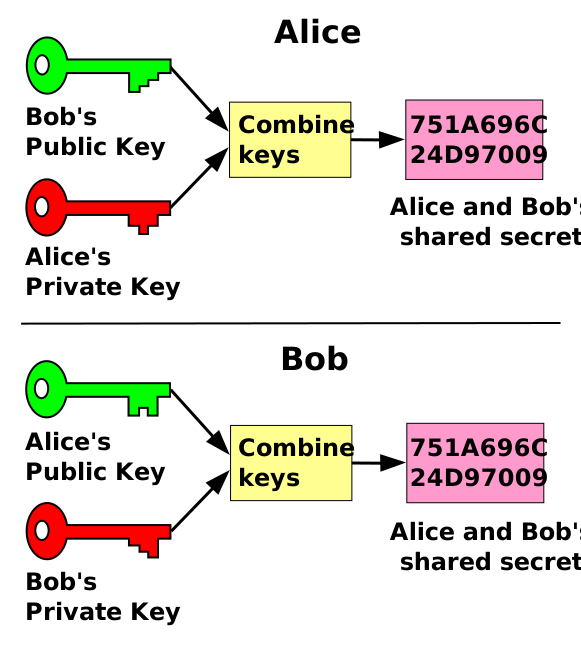
Encryption checks should distinguish data at rest from data in transit. Review whether encryption is appropriately configured for sensitive databases, storage systems, backups, remote connections, and externally transmitted information. Where cryptographic controls are used, the checklist can also examine key management, certificate lifecycle processes, access to secrets, rotation practices, and protection of recovery material.
The goal is not to treat encryption as a universal answer to every security problem. Encryption can protect confidentiality, but it does not replace access control, endpoint security, monitoring, secure configuration, or reliable recovery. A mature checklist therefore evaluates encryption as one component of a broader information-protection system.

Logging, monitoring, and detection
Security monitoring checks should establish whether important events are actually visible. Review authentication events, privileged actions, configuration changes, security alerts, endpoint activity, network events, and other logs that matter to the organization’s threat model. The checklist should identify which logs are collected, where they are stored, who reviews them, and how long they are retained.
Logging without review can create an illusion of control. A useful checklist therefore asks whether alerts have defined owners, whether high-value alerts are investigated, whether time synchronization supports reliable analysis, and whether log access itself is restricted. Where centralized monitoring is used, the checklist should verify that important systems are actually connected to the monitoring architecture.
Detection controls should also be tested through realistic scenarios. For example, the reviewer might verify whether unusual administrative activity, repeated authentication failures, suspicious endpoint behavior, or unexpected configuration changes would generate a detectable event. The purpose is to connect technical telemetry with an actionable response process.


Email, phishing, malware, and user awareness
Security protocols are not only technical. Users interact with email, websites, files, credentials, and business systems every day, so the checklist should verify that security awareness is part of normal operations. Training should cover topics relevant to the organization, including credential protection, suspicious messages, reporting procedures, removable media, sensitive data handling, and other realistic risks.
A checklist can evaluate whether personnel know how to report suspicious activity and whether reporting routes are practical. It can also verify that training is tracked, refresher activities are scheduled, high-risk groups receive appropriate additional guidance, and lessons from incidents are incorporated into future awareness efforts.
Phishing controls should not rely solely on user vigilance. Email filtering, authentication controls, endpoint defenses, browser protections, attachment handling, and monitoring should support the human layer. A good checklist therefore examines both preventive technology and the organization’s ability to recognize and respond to suspicious messages.

Backup, recovery, and resilience
Recovery controls should verify more than whether backups exist. Review backup coverage, frequency, retention, access restrictions, storage separation, monitoring, and restoration testing. Critical systems should have recovery requirements that are understood by the people responsible for restoring them.
Restoration testing is especially important because an untested backup cannot be assumed to be a reliable recovery mechanism. A checklist can record the date of the most recent restoration test, the systems tested, whether the expected data was recovered, any problems discovered, and the corrective action taken.
Resilience also includes dependencies. Recovery plans should consider identity services, network connectivity, DNS, certificates, third-party platforms, cloud resources, documentation, and personnel availability. The checklist should therefore connect technical recovery tasks with business continuity requirements and communication responsibilities.

How to structure the checklist fields
A practical checklist becomes much easier to operate when every row follows a consistent structure. A useful minimum is control ID, security domain, control statement, expected evidence, status, priority, owner, review date, and notes. Additional fields can include remediation deadline, exception reference, evidence location, risk rating, verification method, and closure date.
Status values should be clear and limited. Options such as Implemented, Partially Implemented, Not Implemented, Not Applicable, and Needs Verification are often more informative than a simple yes-or-no field. “Needs Verification” is valuable because it separates an unknown state from a confirmed deficiency.
Evidence should be specific enough that another reviewer can understand how the result was reached. Examples include configuration exports, policy records, access-review records, vulnerability reports, backup test results, incident records, training records, architecture diagrams, or screenshots. Avoid putting sensitive credentials, secrets, or unnecessary personal information directly into the checklist.
Choosing PDF, spreadsheet, and Word formats
The phrase it security protocols checklist template pdf usually reflects a need for a stable, printable assessment record. PDF is useful when a completed assessment needs to be preserved as evidence or circulated as a fixed document. It is less convenient for collaborative tracking, calculations, filtering, and recurring remediation management.
An it security protocols checklist template excel is more appropriate when the checklist will be actively maintained. Spreadsheet fields can support sorting, filtering, ownership, due dates, scoring, status tracking, and remediation views. However, the structure should be controlled carefully so that users cannot accidentally overwrite formulas, change required fields, or create inconsistent status values.
An it security protocols checklist template word works well when the primary objective is a narrative assessment, formal review document, policy-linked checklist, or auditor’s working paper. Word is particularly useful when each control needs explanatory notes and evidence commentary. Many organizations ultimately use more than one format: a working spreadsheet for tracking and a fixed document for formal reporting.
Connecting the checklist to audits and procedures
An it security audit checklist template should be designed around the audit objective rather than around a generic collection of technical terms. An internal audit may emphasize policy adherence and evidence, while a technical assessment may emphasize configuration and exposure. A supplier assessment may focus on third-party controls, contractual obligations, incident notification, access, and data handling.
A broader information security procedure checklist can sit beneath the audit layer and verify recurring operational activities. For example, monthly vulnerability review, periodic privileged-access review, backup restoration tests, security-event review, patch verification, supplier review, and security awareness activities can each have their own recurring control record.
The checklist should also distinguish between a finding and a remediation task. A finding describes the condition observed and its significance. A remediation task describes what must change, who owns it, when it is due, and how completion will be verified. Keeping these concepts separate makes reporting clearer and prevents a long list of observations from becoming an unmanageable action list.

Recurring maintenance and review
A checklist loses value if it is created once and then forgotten. The maintain security checklist template concept is therefore important: each control should have an appropriate review frequency based on risk and operational change. Some checks may be continuous or automated, while others may be monthly, quarterly, annually, or triggered by major changes.
Review frequency should not be identical for every organization. A rapidly changing cloud environment may require more frequent checks than a static environment, while a highly sensitive system may need tighter verification than a low-impact service. The checklist should document the reason for its review interval so that frequency becomes a deliberate risk decision rather than an arbitrary calendar habit.
Change management should trigger checklist updates. New systems, acquisitions, cloud migrations, major software changes, new suppliers, significant incidents, or changes in business processes can invalidate an old checklist. A mature security program periodically asks whether the checklist still represents the actual environment rather than assuming that an old document remains accurate.

Security training and operational readiness
A security training checklist template should connect learning activities with the risks employees actually face. Core topics can include credential security, phishing recognition, incident reporting, data handling, acceptable technology use, remote-work practices, and role-specific responsibilities. Training records should show who received the required material and when, without placing unnecessary personal information into the security checklist.
Operational readiness can also be tested through exercises. A simulated incident can reveal whether staff know who to contact, whether escalation paths work, whether technical teams can access the information they need, and whether management understands decision responsibilities. These exercises provide evidence that a written procedure can function under pressure.
Training should feed back into the checklist. If an exercise reveals uncertainty about reporting, the corresponding control can be revised. If repeated incidents show a weakness in a particular process, the checklist can add a more specific verification step. This creates a feedback loop between security operations, human behavior, and documented controls.
Incident response and escalation
Incident response controls should identify who leads response, who acts as a backup, how incidents are reported, how severity is determined, and how communications are managed. The checklist should verify that contact information is current and that personnel understand their responsibilities. It should also confirm that incident records capture enough information to support analysis and later review.
Response procedures should address detection, analysis, containment, eradication, recovery, and lessons learned. Different incident types may require different procedures, so the checklist should confirm that the organization has appropriate playbooks or decision guidance for its most significant scenarios. These could include credential compromise, malware, data exposure, cloud-account compromise, or service disruption.
After an incident, the checklist should verify that lessons learned are converted into improvements. Controls may need revision, access may need to change, monitoring may need adjustment, or training may need reinforcement. Incident response therefore should not be treated as a separate emergency function; it should influence the wider security-control program.

Practical Solution
Start by defining the scope of the checklist before writing individual controls. Identify the business units, systems, cloud services, networks, data types, suppliers, and processes that are actually in scope. Then choose a recognized framework as the organizing backbone and tailor its concepts to the environment. Create control statements that describe observable conditions, rather than vague goals such as “maintain strong security.” Each control should answer what must be true, what evidence proves it, who owns it, and what happens if it is not satisfied.
Next, build the checklist around risk and operational ownership. Assign a unique control ID and include fields for status, evidence, priority, owner, review date, and remediation. Separate technical controls from procedural controls where necessary, and include an exception mechanism for legitimate situations where a control cannot be implemented exactly as written. Test a small sample with the people who will actually use the checklist; unclear wording is much easier to fix before the checklist becomes part of a formal audit process.
Finally, turn the checklist into a recurring management workflow. Review high-risk findings first, assign realistic remediation dates, verify completed actions, and retain evidence of closure. Reassess the checklist after major technology or business changes. For teams that need ongoing tracking, an security checklist template excel structure can make ownership and status easier to manage, while a formal document can capture assessment context. The objective is a living control process that continually improves security rather than a document that merely records a point-in-time inspection.

Example checklist workflow for a small IT environment
Consider a hypothetical organization with cloud email, a small collection of laptops, a business application, remote access, and several external service providers. The first assessment could establish the asset inventory, review administrative accounts, confirm multi-factor authentication, examine endpoint protection, review backup coverage, check patch status, and verify incident-reporting procedures. The reviewer would record evidence and assign priorities instead of simply marking controls as complete.
Suppose the assessment discovers that former contractor accounts are disabled inconsistently. The finding should identify the affected process, explain the risk, assign an owner, and establish a remediation deadline. The follow-up check should verify that the account lifecycle procedure was changed and that the new process works in practice. This is more useful than recording a generic statement that “access management needs improvement.”
The same environment might have strong backups but no recent restoration test. The checklist should therefore distinguish between backup existence and recoverability. A restoration exercise can produce evidence that the organization can recover a selected workload, while also revealing documentation or dependency problems. Those findings can then be incorporated into the next checklist revision.

Common checklist mistakes to avoid
The first common mistake is excessive vagueness. Statements such as “security is reviewed regularly” are difficult to test and easy to interpret differently. Replace them with measurable checks that specify the system, activity, expected condition, evidence, and review interval. The second mistake is treating every control as equally important. Priority should reflect business impact, exposure, likelihood, and the consequences of failure.
Another mistake is creating a checklist that only evaluates technology. Security also depends on people, processes, suppliers, governance, recovery, and communication. A firewall can be correctly configured while an organization still lacks an effective incident-reporting route or reliable access termination process. A balanced checklist should therefore cover technical, administrative, and operational controls.
A final mistake is allowing the checklist to become stale. Security environments change quickly, and a control that made sense two years ago may no longer reflect current architecture. Schedule periodic reviews and trigger additional reviews after major technology, supplier, organizational, or threat changes. The checklist should evolve as the environment evolves.

How to measure checklist effectiveness
Completion percentage alone is a weak measure. A team could close many low-risk items while leaving several critical weaknesses unresolved. Better measures include the number of high-priority findings, overdue remediation items, recurring findings, controls without evidence, unresolved exceptions, and the time required to verify corrective actions.
Another useful measure is evidence quality. If reviewers repeatedly find that a control is marked complete but cannot locate supporting evidence, the organization may have a process-quality problem even if the checklist appears highly complete. Evidence should be sufficient to support reasonable verification without becoming an unnecessary repository for sensitive information.
Trend analysis can make the checklist more valuable to management. Comparing recurring assessments can show whether weaknesses are being reduced, whether certain control domains repeatedly generate findings, and whether remediation is becoming more effective. The checklist then becomes a management instrument for improving security maturity rather than simply an audit form.

Reference Examples
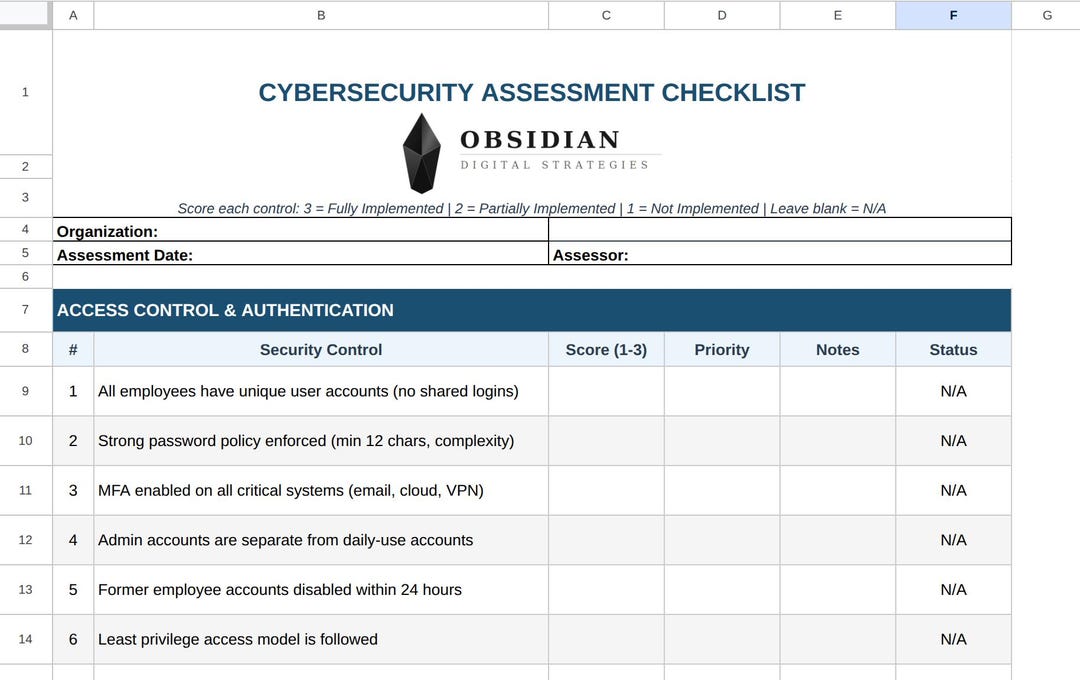
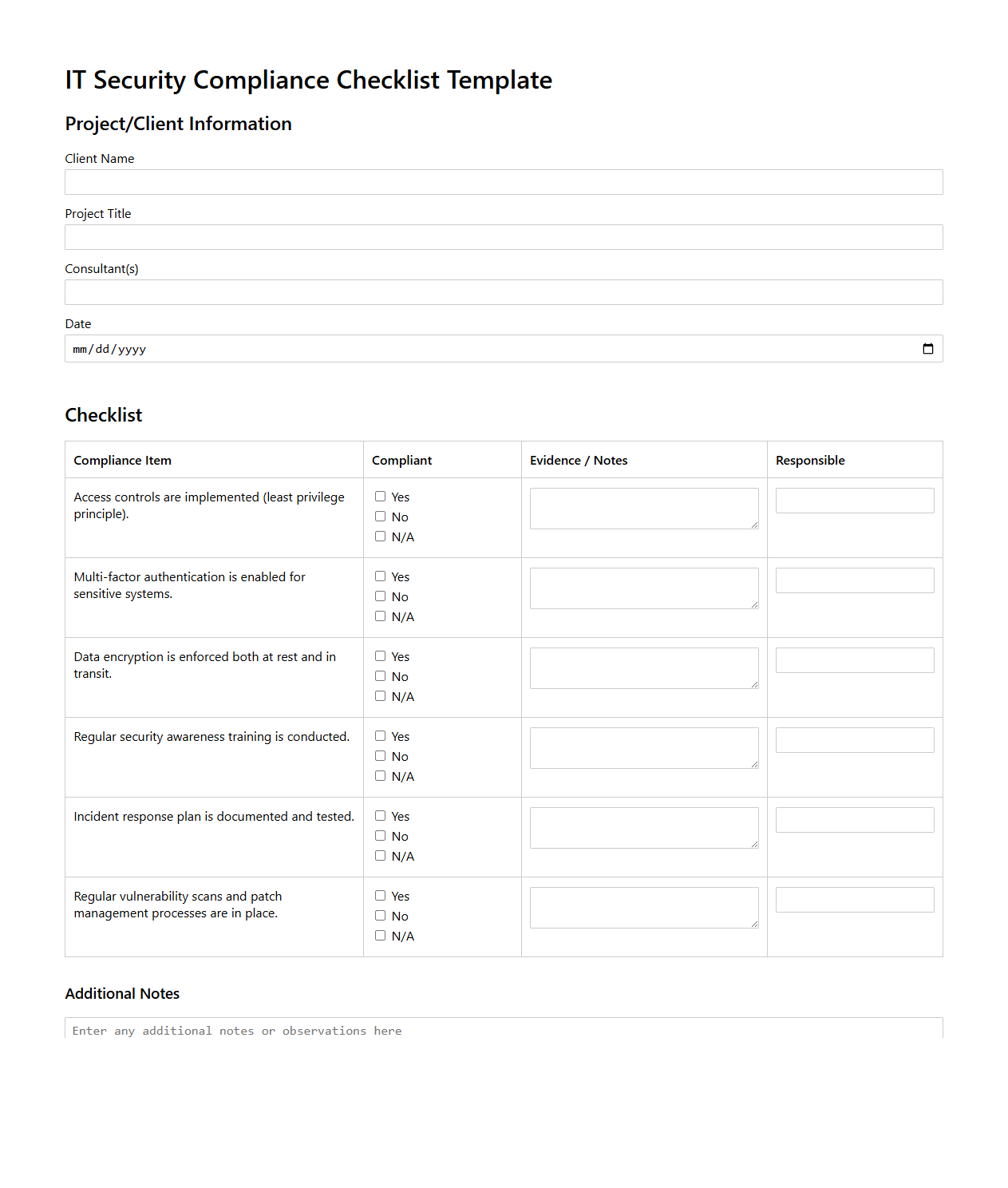
Reference examples help clarify what an it security protocols checklist Template can look like when its controls are converted into a practical working document. Useful examples tend to show recognizable structures such as control statements, status fields, evidence areas, owners, priorities, review dates, and remediation notes. They also demonstrate that a checklist does not have to resemble a single universal form. A spreadsheet-style assessment can support scoring and tracking, while a document-style checklist can provide more room for audit observations. Framework diagrams are useful alongside checklist samples because they show how individual controls fit into broader governance, protection, detection, response, and recovery activities.
The following visual references provide different ways to understand the structure behind an it security protocols checklist Template . Some emphasize risk assessment, others incident response, access management, network architecture, cloud security, or recovery. They should be treated as examples of structure and visual organization rather than as mandatory organizational requirements. When adapting any reference, align the controls with the systems, data, business processes, risk tolerance, contractual obligations, and security framework that apply to the environment being assessed.
Cloud Security
Source: Wikimedia Commons
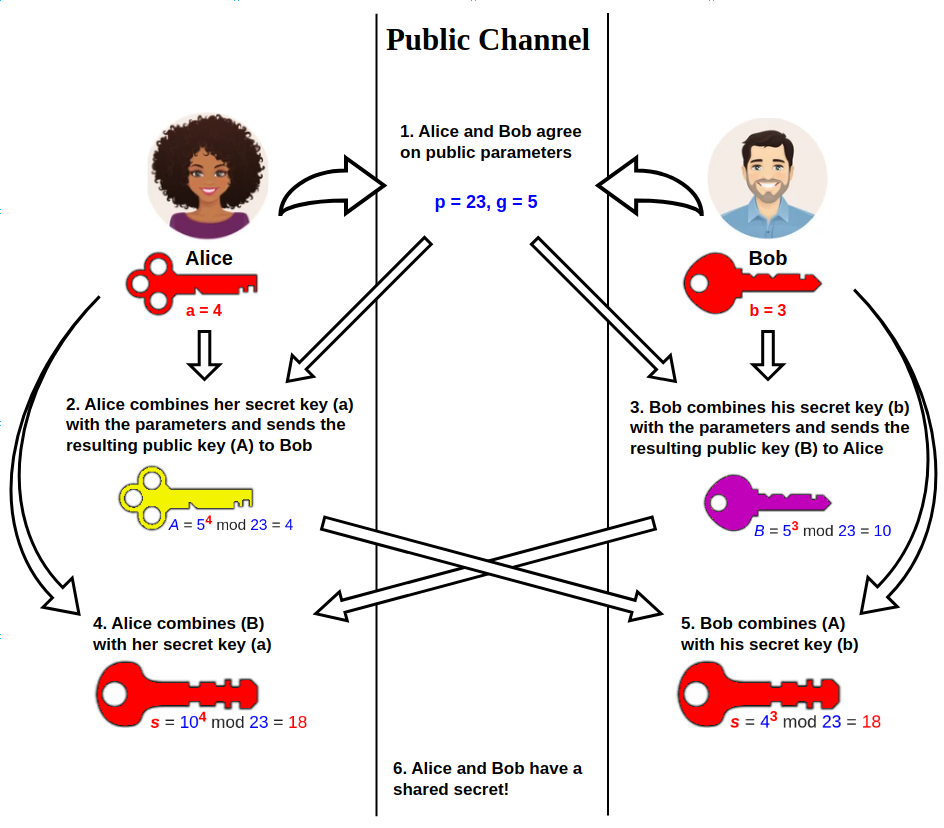
Diffie-Hellman Key Exchange
Source: Wikimedia Commons
Role-based access control
Source: Wikimedia Commons
NIST Incident Response Workflow Diagram
Source: Wikimedia Commons
Public key shared secret
Source: Wikimedia Commons

Sample network diagram
Source: Wikimedia Commons
Cybersecurity Assessment Checklist
Source: Obsidian Digital Strategies
Incident Response Plan Checklist
Source: Template.net
IT Security Compliance Checklist Template
Source: Documentof
