A digital marketing agency ugc campaign analytics Template is most useful when it does more than collect views and likes. A strong measurement framework connects campaign objectives, creator content, publishing details, audience response, traffic, conversions, costs, and business outcomes in one consistent structure. That makes it possible to explain not only what happened, but also which creative choices contributed to the result and what an agency should change next.
User-generated content can generate data across several layers at once. A single creator video may have organic views, paid impressions, comments, shares, profile actions, link clicks, attributed purchases, and production costs. If those values are stored without consistent campaign IDs, content IDs, dates, platforms, and attribution fields, the resulting report can look polished while still being difficult to trust.
The most useful template therefore works as a measurement model before it becomes a reporting document. It defines what the agency will collect, where each value comes from, how calculations are made, how organic and paid performance are separated, and how results will be interpreted. Current UGC analytics guidance commonly separates content production, audience engagement, web behavior, commerce, rights management, and campaign-level performance rather than relying on one headline metric. :contentReference[oaicite:0]{index=0}
This article explains how to structure that system, which fields matter, how to compare creators and assets, how to connect campaign activity with commercial outcomes, and how to turn the resulting data into a client-ready reporting workflow. The examples are illustrative unless explicitly identified as sourced observations.

What a UGC campaign analytics template should accomplish
The central purpose of the template is to create one reliable record for every meaningful content asset. At minimum, an agency should be able to identify the client, campaign, creator, platform, asset, publication date, content format, campaign objective, distribution type, and reporting period. These identifiers provide the context required to interpret performance rather than treating every number as an isolated result.
A useful structure also distinguishes operational metrics from outcome metrics. Operational metrics can include briefs issued, assets received, approval status, rights status, publication status, and turnaround time. Performance metrics can include reach, impressions, views, watch behavior, engagements, clicks, conversions, and revenue. Financial fields can include creator fees, production costs, media spend, cost per result, and return measures.
This distinction matters for agencies because a campaign can have excellent creative performance while suffering from operational delays, or it can produce many assets while generating weak commercial results. A reporting system that merges these categories into one score can hide the reason behind the result. Nosto, for example, describes separate content, performance, commerce, email, and related UGC reporting views, illustrating why different analytical layers can answer different business questions. :contentReference[oaicite:1]{index=1}
Start with campaign objectives rather than available metrics
A common reporting mistake is to begin with whichever numbers are easiest to collect. A better method starts with the campaign objective and works backward. If the objective is awareness, reach, impressions, video views, view velocity, and audience distribution may deserve greater attention. If the objective is consideration, meaningful engagement, profile actions, landing-page sessions, and click-through behavior become more useful.
For conversion-oriented UGC, the template should capture the identifiers needed to connect content with downstream actions. These can include campaign IDs, creator IDs, unique tracking parameters, promotional codes, landing-page identifiers, product identifiers, and conversion events. The precise attribution method should match the campaign’s technical setup rather than assuming every sale can be credited directly to a social post.
For production-focused programs, the template should also measure asset volume, approval rate, revision count, time to publish, rights status, and usable-asset rate. These metrics help an agency determine whether a campaign is operationally efficient. Nosto specifically identifies content-source volume, tagged content, time to publish, published-content volume, and rights-management activity as useful areas for UGC analysis. :contentReference[oaicite:2]{index=2}
Writing the objective into the first rows of the template creates an important discipline: every later metric must have a reason for existing. A client report should not contain a metric simply because the platform exposes it. The question should always be, “What decision could this number help us make?”
The core metrics to include
A robust UGC analytics template normally contains several metric families. Exposure metrics describe distribution and visibility, including reach, impressions, views, video starts, and frequency where available. Engagement metrics describe audience actions such as likes, comments, shares, saves, and other platform-specific interactions. Traffic metrics cover clicks, sessions, landing-page visits, and other measurable site activity.
Conversion metrics should be connected to a clearly defined event. Depending on the campaign, that might be a purchase, lead, registration, booking, trial start, subscription, or another business action. A template should record both the raw conversion count and the attribution context so that a conversion number is not mistaken for proof of causation.
Cost metrics complete the picture. Depending on the campaign model, these can include creator fee, asset cost, total campaign cost, media spend, cost per thousand impressions, cost per view, cost per engagement, cost per click, cost per acquisition, and revenue-based return measures. Sprout Social describes campaign reporting around spend, clicks, impressions, engagement, conversions, and ROI, while its campaign functionality also supports centralized activation and measurement. :contentReference[oaicite:3]{index=3}
Video UGC benefits from additional creative signals. Hook performance, watch time, completion behavior, share rate, save rate, comment quality, and profile actions can help explain why two videos with similar reach produce different outcomes. The important principle is to keep the definition of each metric consistent. If one report calculates engagement from reach while another calculates it from impressions, comparisons can become misleading.
Do not force every available metric into the dashboard. A client-facing report might need ten to fifteen highly relevant measures, while the underlying data sheet can contain more fields for analysis. The dashboard should emphasize decisions; the underlying dataset should preserve the detail needed to investigate those decisions.
Build a consistent data model for every asset
The most important structural decision is usually the row level. For creator campaigns, one row per published asset is a practical starting point because it lets the agency compare individual videos, images, posts, and other content units. Campaign-level summaries can then be calculated from those asset records rather than entered manually.
Useful identity fields include Client ID, Campaign ID, Creator ID, Asset ID, Platform, Post ID, Content Type, Product, Market, Creative Angle, Hook, Funnel Stage, Organic or Paid Status, Publish Date, and Reporting Period. Keeping these fields standardized makes filtering and aggregation much easier. It also reduces the chance that two team members use different names for the same campaign or creator.
Performance fields should be separated from calculated fields. For example, raw views and raw engagements can be entered from a platform source, while engagement rate can be calculated from those values. Likewise, spend and revenue can be source fields, while return on ad spend or cost per acquisition can be derived fields. This approach makes audits easier because a reviewer can trace a calculation back to the underlying numbers.
A practical dataset can also include a Notes field for qualitative observations. Comments about a strong hook, recurring audience objection, creative mismatch, product issue, or unusual distribution pattern can become valuable context during optimization. Quantitative metrics explain what happened; qualitative observations often help explain why.
Measure content performance at the asset level
Asset-level analysis is where a UGC campaign analytics template becomes genuinely useful. Instead of reporting that a campaign generated a certain number of views, the agency can identify which individual creative concepts produced the strongest response. That makes creative learning actionable because the team can repeat successful hooks, demonstrations, formats, offers, or storytelling structures.
Each asset should ideally carry creative descriptors. Examples include problem-solution, testimonial, product demonstration, comparison, tutorial, unboxing, reaction, lifestyle, founder-style explanation, or offer-led creative. These labels are not universal industry standards; they are organizational categories that an agency can define for its own testing system.
The same approach can be used for hooks. A campaign might classify hooks as question-led, problem-led, benefit-led, curiosity-led, proof-led, objection-led, or demonstration-led. If one category consistently generates stronger downstream behavior within the same campaign conditions, that observation becomes more useful than simply naming one creator as the winner.
Performance should also be considered relative to the distribution context. A video that receives paid reach should not be directly compared with an organic-only post without identifying the difference. Similarly, a creator’s audience size, platform, publication timing, and campaign placement can affect exposure. The template should preserve those contextual fields so analysts do not mistake distribution differences for creative quality.

Compare platforms without mixing incompatible measurements
Instagram, TikTok, YouTube, and other channels expose different measurement concepts and interfaces. A good template can place them in a common reporting model, but it should not pretend that every metric has identical meaning across networks. For example, a view event can have platform-specific definitions, while reach may be estimated or reported differently depending on the channel.
Use standardized internal fields alongside a source-specific field when necessary. An agency might have an internal field called Video Views and another field called Platform View Definition. The first supports high-level reporting; the second preserves the context needed for careful interpretation.
Cross-platform reporting should focus on comparable business questions. Instead of asking which network has “better views,” ask which network produced the strongest qualified traffic, which creative format earned the best engagement relative to exposure, or which platform generated the most efficient conversion activity under the same objective.

Track creators without reducing performance to follower count
Creator-level reporting should contain both scale and efficiency. Follower count provides audience context, but it does not explain whether a specific creator’s campaign content generated meaningful response. A more useful creator record can include published assets, reach, impressions, engagement, clicks, conversions, creator cost, cost efficiency, and qualitative content notes.
Agencies can also compare creators by content role rather than ranking everyone together. One creator may be especially effective at product education, another at social proof, and another at short-form entertainment. A single overall leaderboard can hide these differences. Segmented comparisons are often more useful when the campaign involves multiple creative objectives.
Creator reporting should also preserve production information. If one creator consistently submits assets on schedule with few revisions, that operational reliability can have agency value even when another creator achieves higher raw reach. A complete campaign view therefore considers both content performance and delivery quality.

Use funnel stages to connect creative and business outcomes
A UGC campaign can be mapped to awareness, consideration, and conversion stages, provided the agency defines those stages clearly. Awareness content may prioritize reach and attention. Consideration content may focus on engagement, profile actions, traffic, or product exploration. Conversion-oriented content may emphasize measurable sales, leads, bookings, or other business events.
The funnel should not be interpreted as a claim that every user moves through a perfectly linear sequence. Real customer journeys can involve multiple channels and repeated exposures. The funnel is primarily a planning and reporting framework that helps an agency understand what each asset was intended to accomplish.
When the template includes a Funnel Stage field, creative performance can be compared within the correct objective. This prevents an awareness asset from being judged solely by a conversion metric that it was never designed to maximize.

Build attribution into the template from the beginning
Attribution should be planned before the campaign launches. A basic structure can use campaign-specific tracking parameters, unique creator identifiers, promotional codes, dedicated landing pages, or other measurable mechanisms. The chosen approach depends on the campaign and the analytics environment.
Every attribution method has limitations. A person may see a creator post, later search for the brand, visit through another channel, and eventually purchase. A last-click system may assign the sale elsewhere even though the UGC influenced the journey. Conversely, an overly broad attribution model can assign too much credit to creator content.
For this reason, the template should record both attributed outcomes and attribution methodology. Include fields such as Attribution Model, Tracking ID, Creator Code, Campaign Parameter, Conversion Window, and Conversion Source when applicable. This makes reports more transparent and helps clients understand what the numbers actually represent.
UGC analytics platforms increasingly emphasize this connection between engagement and commercial behavior. Yotpo describes conversion reporting that compares activity associated with UGC exposure and interaction, while Nosto’s commerce reporting includes conversion rate, revenue, transactions, and average order value associated with UGC activity. :contentReference[oaicite:4]{index=4}

Calculate cost and return consistently
Cost calculations become especially important when an agency manages many creators or multiple waves of content. A template should distinguish creator compensation from paid media spend and from other campaign expenses. If production costs, shipping, licensing, editing, or management fees are included, define them consistently before calculating efficiency.
Common derived measures include cost per view, cost per engagement, cost per click, cost per acquisition, and return on ad spend. These formulas should be documented in the template so that team members know exactly which numerator and denominator are being used. For example, cost per engagement should specify whether engagements include all interactions or only selected actions.
Return measures should be treated carefully when organic creator content and paid amplification are combined. If the agency reports a blended return, label it as blended. If it reports paid media return, exclude unrelated organic production costs unless the methodology explicitly includes them. Clear labels prevent clients from comparing figures that were calculated on different bases.
For an illustrative scenario, suppose a campaign spends $5,000 across creator fees and media and records 2,000 attributed conversions with $12,000 in attributed revenue. Those values can be used to demonstrate a calculation method, but they are hypothetical and should never be presented as a benchmark or expected result.

Design the dashboard around decisions
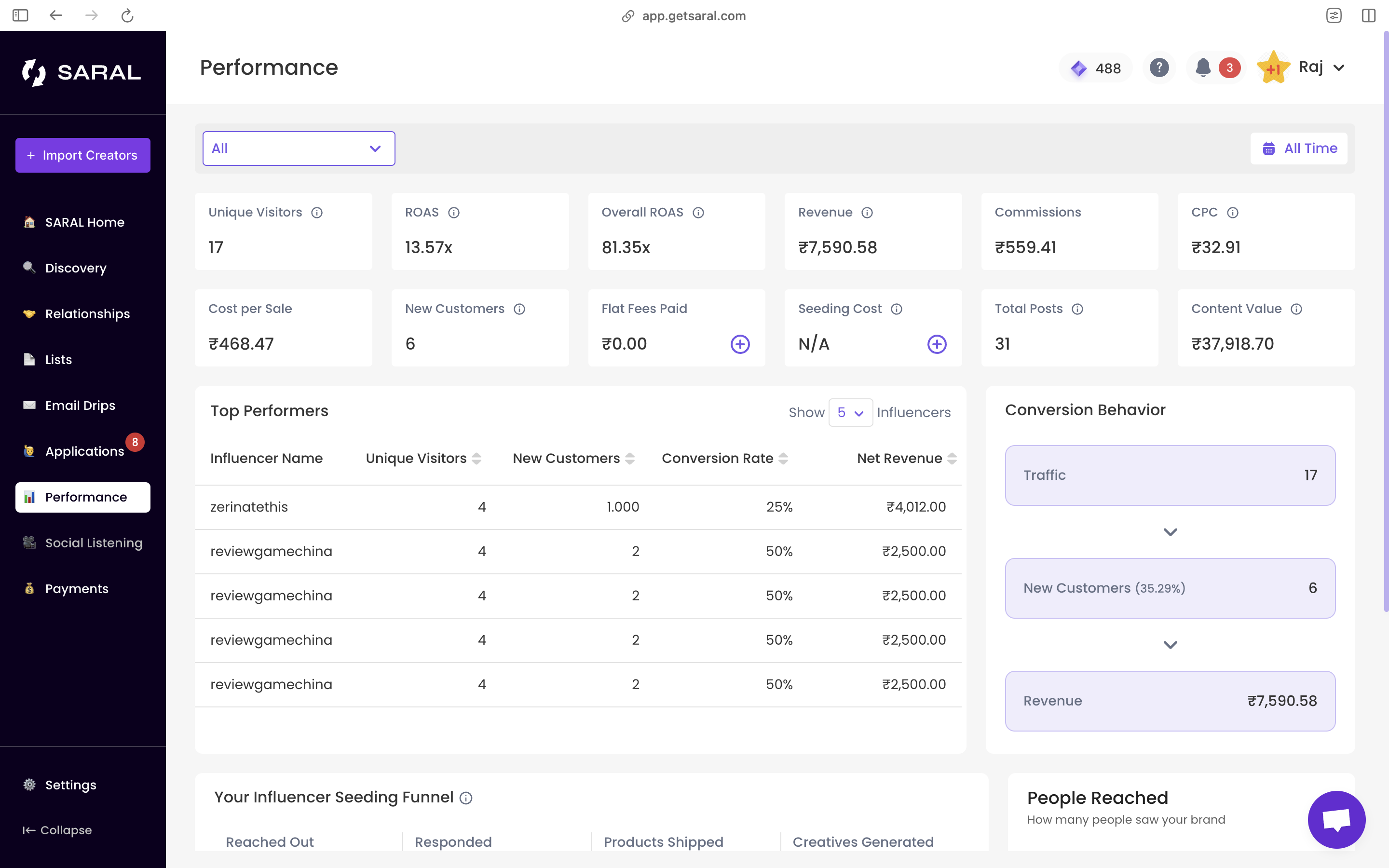
The dashboard layer should summarize the underlying dataset rather than become another place where values are manually typed. A practical first view can contain campaign status, reporting period, total assets, total reach, total views, total engagements, clicks, conversions, spend, revenue, and selected efficiency metrics.
A second view can focus on creative performance. Rank assets by a chosen metric, then allow filtering by creator, platform, content type, funnel stage, market, and campaign wave. A third view can focus on creators. A fourth can examine paid versus organic distribution. Agencies working across multiple clients can also maintain a separate executive view that removes operational detail and highlights the few findings that matter most to stakeholders.
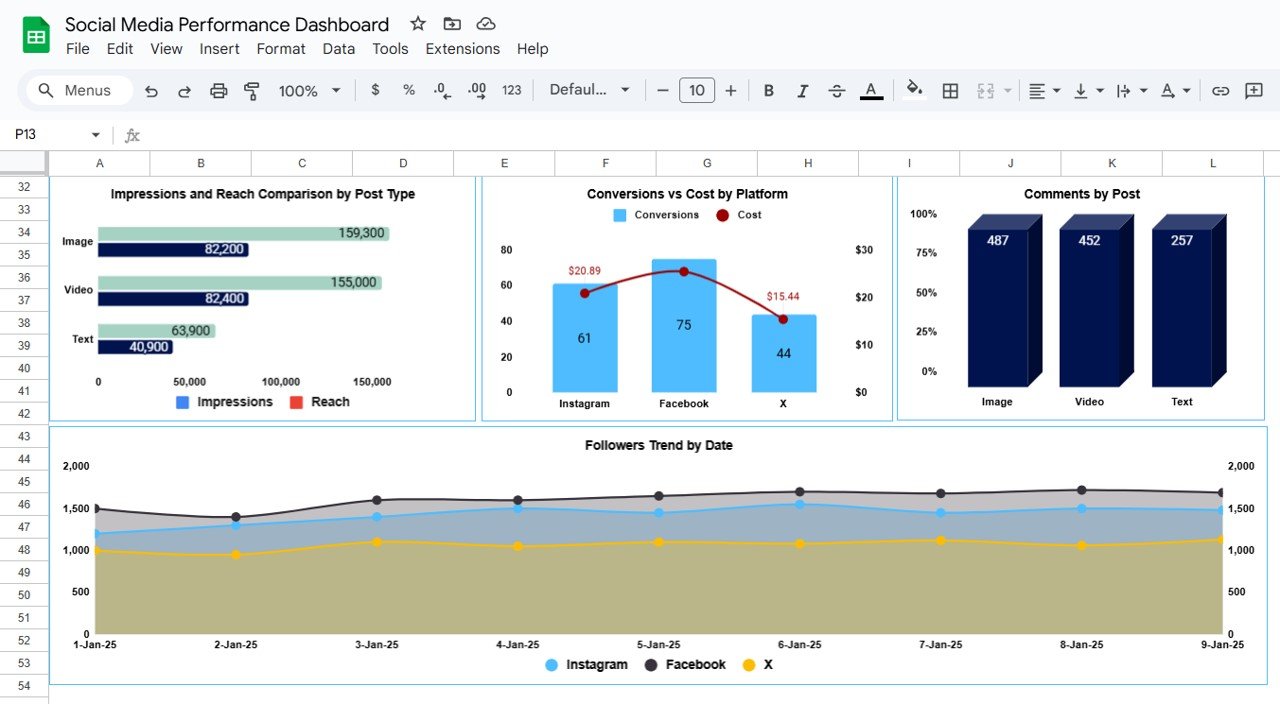
Charts should answer specific questions. A line chart can show performance over time. A bar chart can compare creators or content categories. A funnel can show movement between stages. A scatter plot can compare cost with conversion efficiency. A heatmap can help reveal publishing patterns. The visualization should follow the question rather than the other way around.

Spreadsheet-based structure and workflow
A spreadsheet structure remains useful when the campaign is small enough for disciplined manual collection and when the agency needs flexible calculations. One tab can hold campaign settings, another can contain asset-level records, another can store creator information, and another can contain the dashboard. Separating raw records from presentation logic makes maintenance safer.
The data tab should generally use one row per asset and one column per field. Avoid merged cells inside the data range. Keep dates as dates, numeric metrics as numbers, and categorical fields consistent. Where possible, use controlled values for fields such as platform, status, funnel stage, content type, and organic or paid classification.
Formula-driven summaries reduce manual reporting errors. For example, total views can be aggregated by campaign ID, while creator-level summaries can group records by Creator ID. Ratios should be calculated from the aggregated numerator and denominator when appropriate rather than simply averaging individual percentages.
Smartsheet’s marketing campaign examples illustrate the usefulness of combining campaign status, cost, performance, clicks, conversions, and channel-level views within a structured reporting system. Its examples also demonstrate how campaign data can be organized for broader planning and performance analysis.
When a spreadsheet is the right format
A spreadsheet is particularly useful for teams that need transparent calculations, easy sorting, custom formulas, and straightforward collaboration. It can also serve as the canonical data layer beneath a presentation or client report. The key is to treat it as a structured dataset rather than an informal list.
For larger programs, the spreadsheet should become one component of the measurement system rather than the only source of truth. Automated imports, controlled data definitions, scheduled refreshes, and validation checks can reduce repetitive work. The same principle applies whether the underlying workspace is a spreadsheet, database, reporting platform, or business intelligence system.
A useful spreadsheet should also include a data dictionary. Define every field, its source, its calculation, its expected format, and its update frequency. This becomes especially valuable when several account managers or analysts work on the same client portfolio.
Document, presentation, and printable reporting formats
Different stakeholders need different views of the same data. A spreadsheet is generally strongest for analysis, while a document can provide narrative context and a presentation can make the most important findings easy to discuss during a client meeting. A printable report can be useful when the final record needs a stable page-based format.
A document-based report should contain an executive summary, campaign objectives, methodology, performance highlights, creative findings, audience observations, attribution notes, and recommended actions. The underlying metrics should remain consistent with the source dataset. Narrative commentary should explain the data rather than quietly changing its meaning.
A presentation should be more selective. One slide might summarize objectives and headline results, another might show creative winners, another might compare creators, and another might outline the next test cycle. Avoid filling slides with every available metric. The purpose is to help decision-makers understand the evidence quickly.
A printable report is best treated as a presentation of the approved dataset rather than a separate calculation environment. This reduces the risk of having one number in the spreadsheet, another in the presentation, and a third in the final report.
Regional reporting and UK campaign considerations
For agencies serving multiple markets, region should be an explicit field rather than hidden inside campaign names. Record market, currency, language, platform availability, creator location, audience location, and reporting timezone when relevant. These fields help prevent regional performance from being mixed together.
A UK campaign can use the same general analytics architecture as another market, but the agency should keep currency and reporting conventions consistent. If the client reports in pounds while media platforms report costs in another currency, document the conversion basis and reporting date rather than silently mixing values.
Regional segmentation can also expose differences in creative response. A hook that works in one market may require different cultural context, pricing references, language, product availability, or creator positioning elsewhere. The template should therefore support market-level filtering without creating a completely different data structure for every country.

How established reporting tools can inform the template structure
Tools can provide useful ideas for structuring a measurement framework even when an agency ultimately maintains its own reporting model. Sprout Social, for example, describes campaign functionality that brings activation, collaboration, reporting, and ROI measurement into a centralized workflow. Its analytics materials also emphasize campaign and post-level reporting across social channels. :contentReference[oaicite:6]{index=6}
Jotform Tables provides another useful conceptual model because its marketing templates organize campaign information into structured records and allow teams to view data in different formats. Its UTM tracking guidance also describes capturing campaign parameters and reviewing traffic data in its table environment. :contentReference[oaicite:7]{index=7}
These tools should not dictate an agency’s data model. Instead, they demonstrate a broader principle: campaign records, performance measurements, attribution information, and reporting views work better when they are connected. The agency should retain ownership of definitions and decide which fields are actually necessary for its clients.
Quality control before client reporting
Before a report leaves the agency, run a data-quality review. Check that campaign IDs match, dates fall within the reporting period, duplicate assets have not been counted twice, and platform names are standardized. Confirm that organic and paid results are separated correctly and that spend values are associated with the intended campaign.
Then inspect calculations. A percentage should have a valid denominator. A cost metric should use the correct cost base. A revenue figure should have an identified attribution source. If a metric is unavailable, use an explicit missing-data status rather than replacing it with zero unless zero is genuinely the measured value.
Finally, review the narrative against the data. If the report says one creator was the strongest performer, verify the metric used for that statement. If it says a format drove conversions, verify that the attribution method supports that interpretation. This final editorial check is essential because a mathematically correct dashboard can still produce a misleading business conclusion.
Turn analytics into client recommendations
The strongest agency reports end each analysis with decisions. Instead of simply stating that a video achieved strong engagement, explain what feature appears to have contributed to the response and what should be tested next. For example, the recommendation might be to repeat the same demonstration structure with a different creator or test the same hook against a different offer.
Recommendations should be tied to evidence and confidence. If the campaign has limited data, use language such as “the available results suggest” rather than presenting an early pattern as a proven rule. If several assets show the same behavior, the agency can be more confident in recommending a broader creative test.
A useful recommendation framework has four actions: keep, iterate, scale, and retire. Keep assets that meet the objective consistently. Iterate promising concepts with a clear weakness. Scale concepts that combine strong creative response with acceptable economics. Retire concepts that repeatedly fail the campaign objective after reasonable testing.
Practical Solution
Start by creating a single campaign record with a unique Campaign ID and a clearly stated objective. Add one row for each published UGC asset. Give every asset an Asset ID and connect it to a Creator ID, platform, publication date, content type, creative angle, funnel stage, and distribution status. This becomes the foundation for every later summary and protects the reporting process from inconsistent naming.
Next, establish the minimum measurement set before the campaign launches. For most UGC programs, that means exposure, engagement, traffic, conversion, and cost fields, plus the qualitative fields needed to explain creative performance. Define each calculation in writing. If the agency has a different definition of engagement for different channels, record those definitions rather than pretending the values are directly interchangeable.
During the campaign, capture data on a consistent schedule. Record organic performance before paid amplification changes the distribution environment when that distinction matters. Preserve the original values rather than overwriting them, especially when the team needs to study performance growth over time. Keep source references or internal notes so an analyst can investigate an unexpected result.
At reporting time, aggregate the asset-level records into campaign, platform, creator, creative-category, and funnel views. Build the executive dashboard from those summaries. Then write the client narrative around the campaign objective: what was tested, what performed, what did not, what the data suggests, and what the agency recommends doing next.
Finally, turn the report into the next campaign’s starting point. Carry forward winning creative categories, unresolved questions, creator performance observations, attribution lessons, and operational improvements. This transforms the template from a static reporting document into a repeatable learning system for UGC strategy.

Choosing the right reporting depth
Not every client needs the same amount of detail. A small campaign may only require an asset tracker and a concise dashboard, while a large agency program may need separate operational, creative, media, attribution, and commercial views. The underlying data model can remain consistent even when the client-facing presentation changes.
Executives generally need the smallest set of metrics that supports a decision. Campaign managers need more operational detail. Creative teams need asset-level signals. Media teams need distribution and cost information. Finance teams may need spend and revenue reconciliation. The same campaign dataset can support each audience if the fields have been structured carefully.
The most effective reporting system is therefore not necessarily the one with the largest number of charts. It is the one that allows every stakeholder to reach the correct level of detail without losing the relationship between content, distribution, and outcomes.
Reference Examples
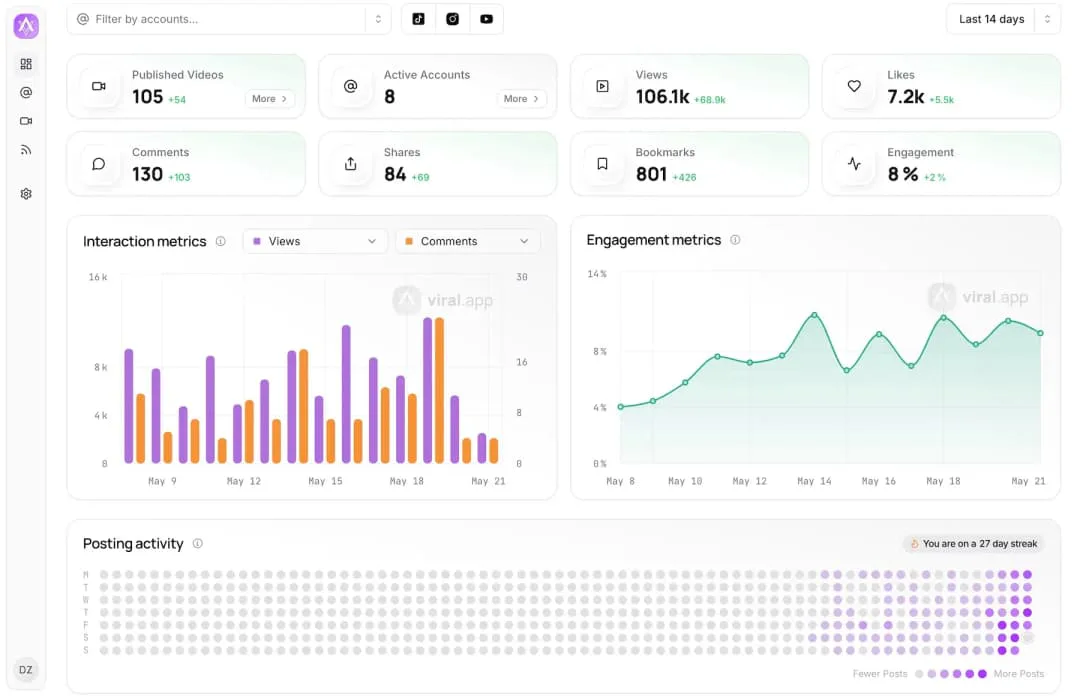
A useful digital marketing agency ugc campaign analytics Template should make UGC performance recognizable at a glance while preserving enough detail for investigation. The strongest examples tend to combine headline indicators with supporting charts, creator or asset breakdowns, campaign timing, cost measures, and outcome signals. Some systems emphasize content production and rights management, while others focus on engagement, traffic, commerce, or creator economics. These differences are valuable because they demonstrate that an analytics template should be shaped by the campaign objective rather than copied as a fixed visual layout.
The following visual references show different ways to present the same broad measurement problem: connecting creator content with measurable campaign activity. They include dashboards, spreadsheets, reporting layouts, and performance views from established marketing and analytics publishers. Use them as structural references when deciding which fields belong in the underlying dataset, which metrics deserve dashboard prominence, and how detailed the client-facing reporting layer should be.
Cohley UGC Campaign Performance Dashboard
Source: Cohley
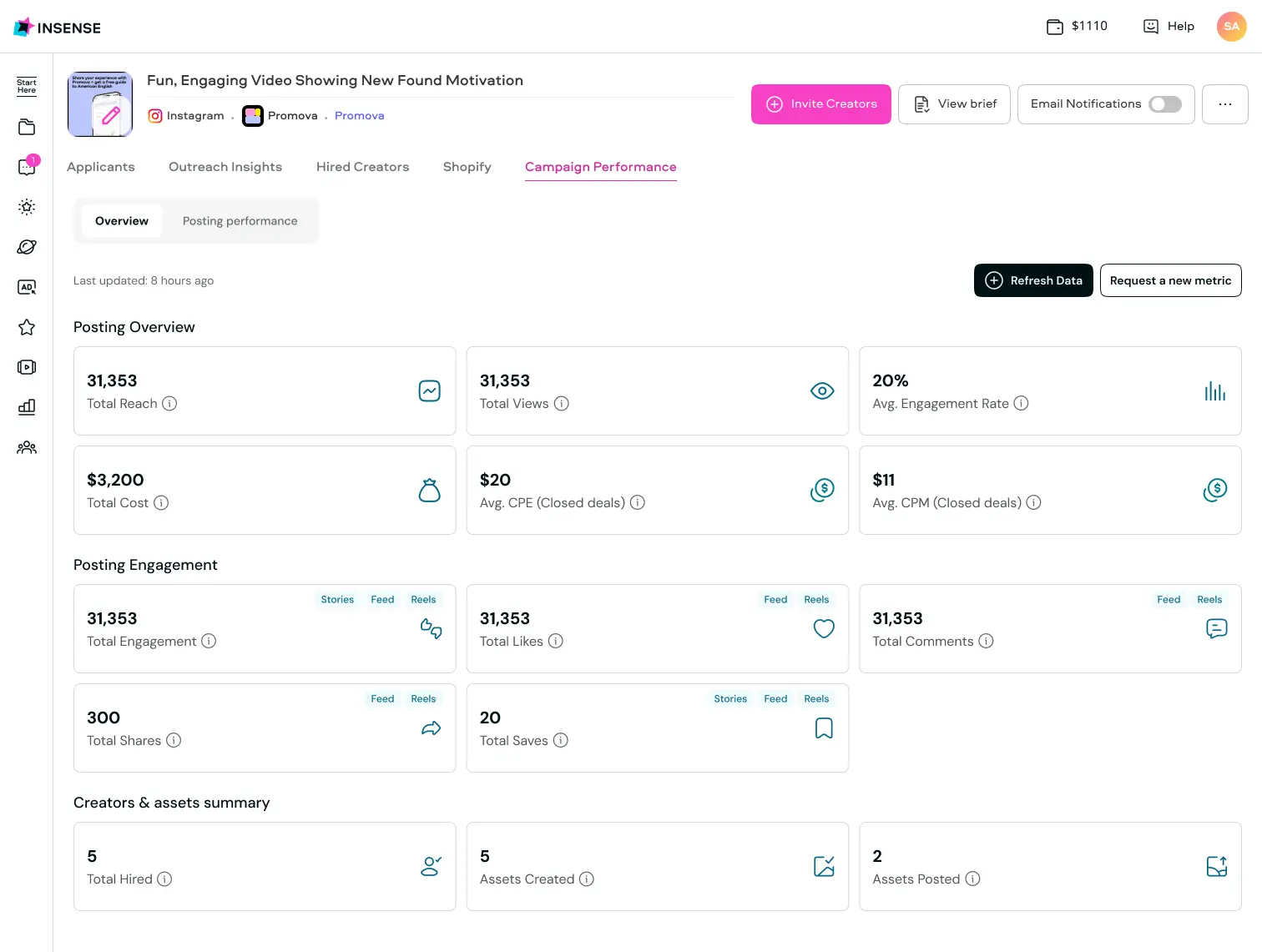
Insense Campaign Performance Overview
Source: Insense
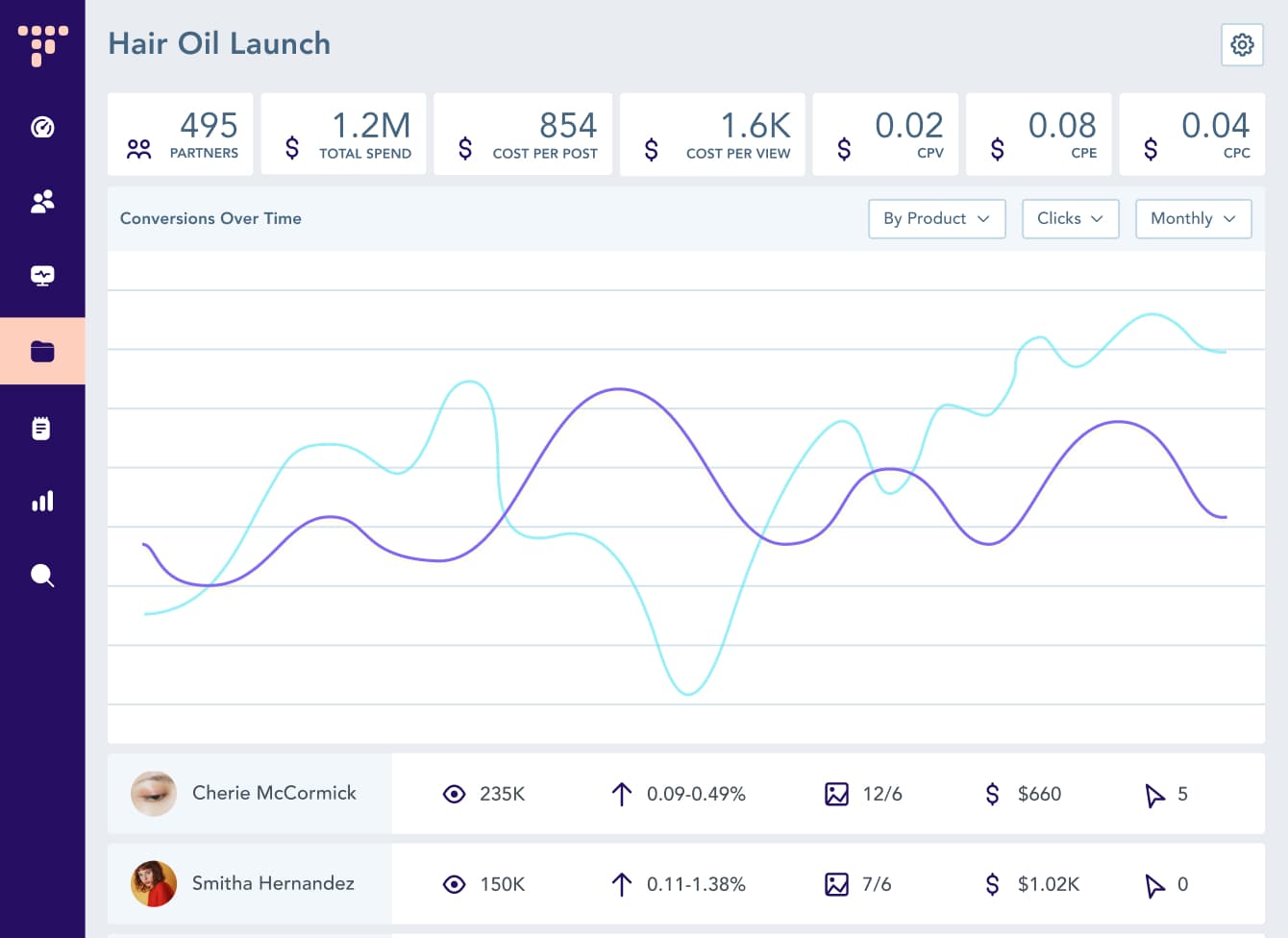
Hair Oil Launch Campaign Dashboard
Source: Traackr
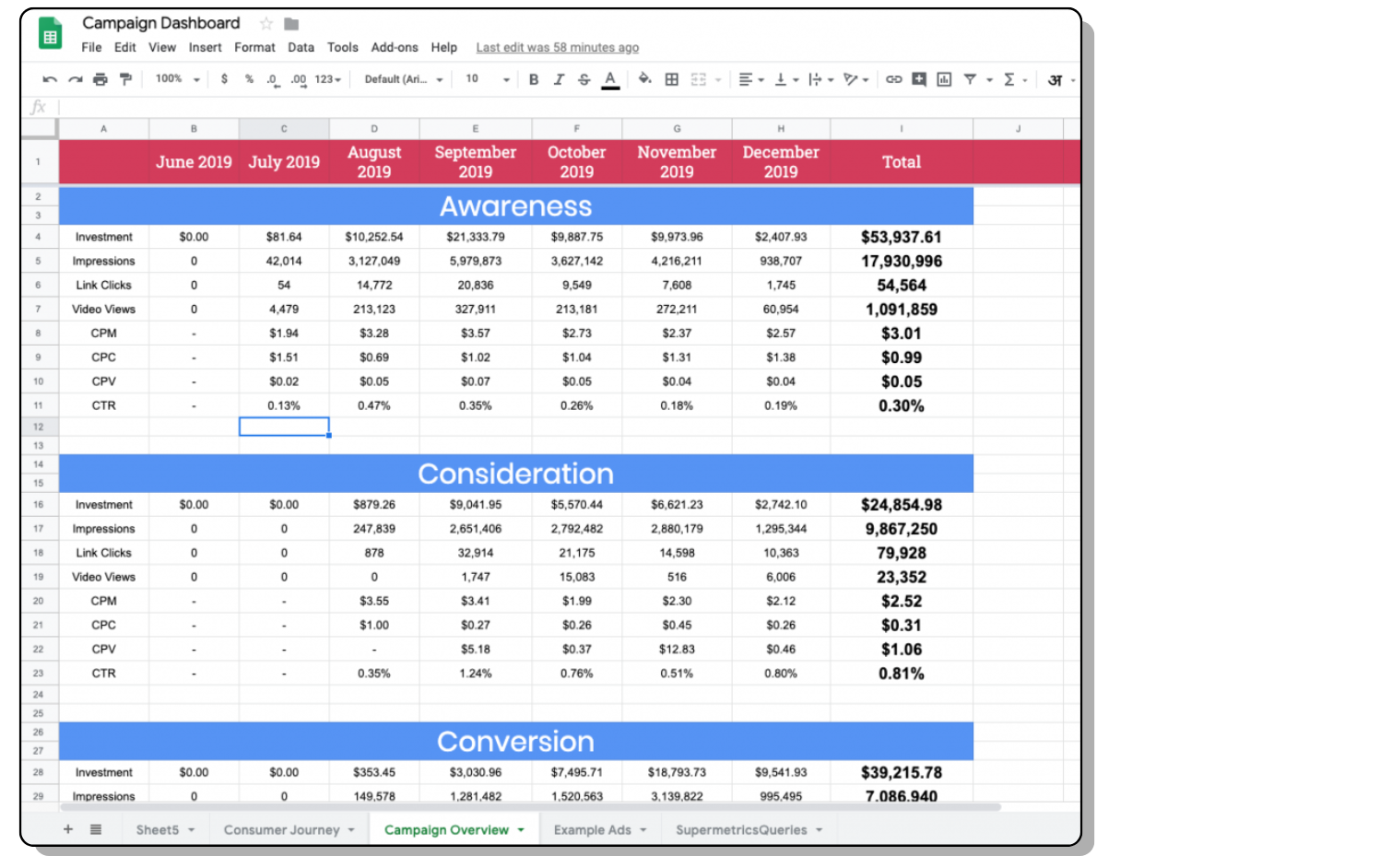
Social Media Reporting Template
Source: AgencyAnalytics
Coca-Cola Campaign Performance Dashboard
Source: Wowzi
Fashion Influencer Campaign Metrics
Source: MightyScout
Social Media Influencer Marketing Campaign Summary Dashboard
Source: SlideTeam
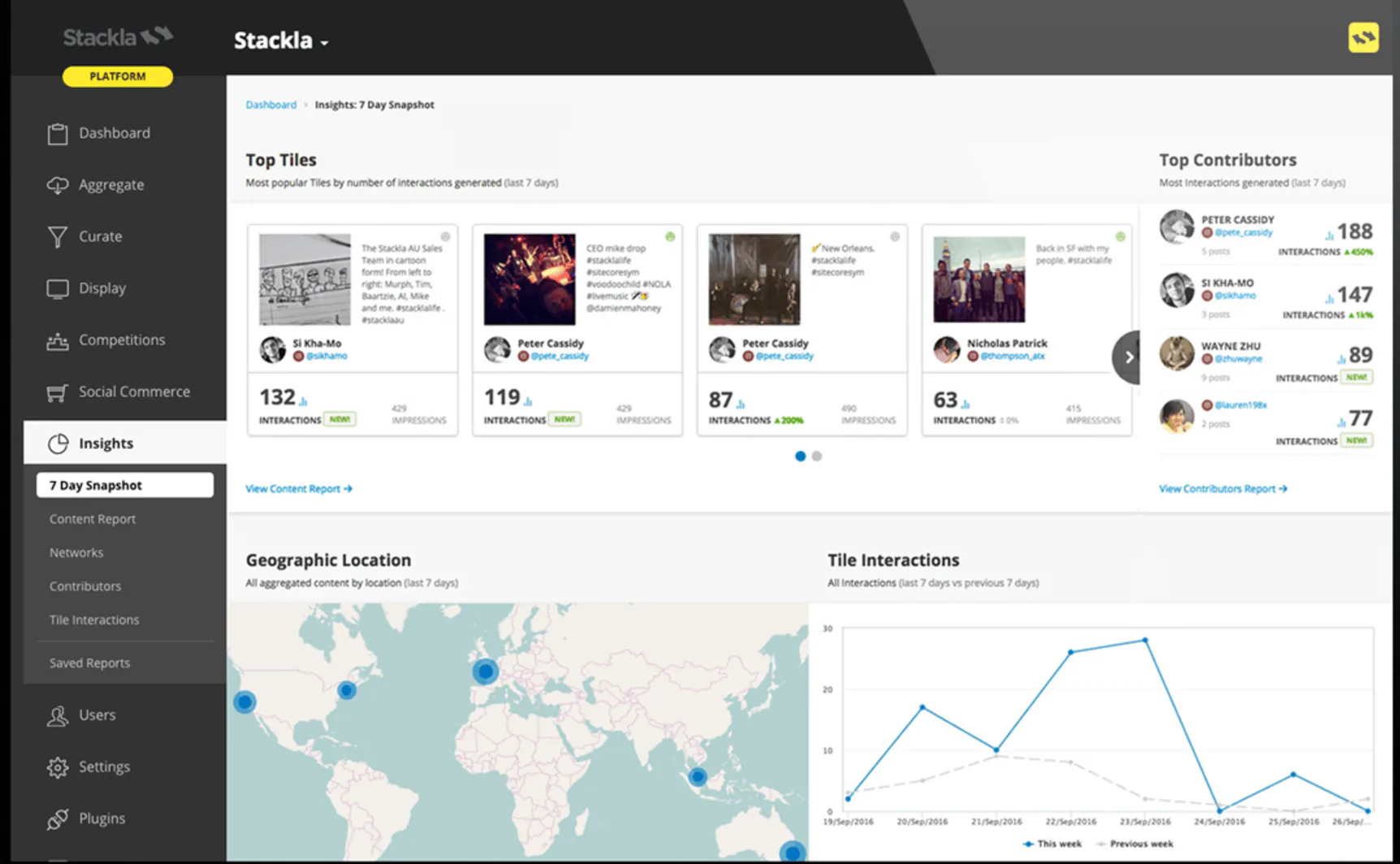
Stackla 7-Day Insights Dashboard
Source: Stackla
Influencer Campaign Performance Overview
Source: The Cirqle
