Running a marketing agency involves more than creating campaigns and delivering creative work. Teams also need to manage leads, client onboarding, content production, approvals, publishing, reporting, invoices, deadlines, and communication. When these activities are handled manually, small tasks can quickly become a major drain on time and productivity.
Marketing agency workflow automation helps agencies connect these repetitive activities into a more organized and efficient process. Instead of relying on spreadsheets, reminders, and repeated manual updates, agencies can use automation to move information between tools, notify team members, create tasks, and keep clients updated.
A well-designed workflow does not remove the human side of marketing. Instead, it gives marketers more time to focus on strategy, creativity, optimization, and client relationships. This guide explains how marketing agencies can build an effective automated workflow, which processes to automate first, and how to avoid common automation mistakes.
What Is Marketing Agency Workflow Automation?
Marketing agency workflow automation is the use of software, rules, triggers, and integrations to automate repetitive steps within an agency’s daily operations. A workflow can start when a specific event occurs and then automatically perform one or more actions.
For example, when a new prospect submits a contact form, an automated workflow could add the lead to a CRM, assign an account owner, send a welcome email, create a follow-up task, and notify the sales team.
The same approach can be applied after a client signs a contract. The system could automatically create a project, generate standard tasks, send an onboarding questionnaire, create a shared folder, and notify the assigned team members.
Common components of an automated marketing agency workflow include:
- Lead capture and CRM management
- Client onboarding and intake forms
- Project and task creation
- Content planning and production
- Approval and revision management
- Social media scheduling
- Email marketing automation
- Client notifications
- Performance reporting
- Follow-up and retention workflows
Why Agencies Need Workflow Automation
Marketing agencies often handle several clients at the same time. Each client may have different campaigns, deadlines, approval processes, communication preferences, and reporting requirements. Without a consistent workflow, important information can easily become scattered across email, chat applications, spreadsheets, project management platforms, and cloud storage.
Automation creates a repeatable system for handling these activities. It can reduce unnecessary administrative work while making responsibilities and deadlines easier to track.
Save Time on Repetitive Tasks
Many agency tasks are repetitive. Creating a project from a standard template, sending onboarding emails, assigning tasks, updating statuses, and generating recurring reports are examples of work that can often be automated.
Saving a few minutes on one task may not seem significant. However, when the same task is repeated hundreds of times each month, the accumulated time savings can become substantial.
Reduce Process Errors
Manual processes depend heavily on people remembering every step. A missed notification or forgotten task can delay an entire campaign.
Automation provides predefined rules that help ensure important steps happen consistently. For example, an approved content item can automatically move to the publishing stage instead of waiting for someone to remember to update its status.
Create a Better Client Experience
Clients appreciate clear communication and predictable processes. Automated status notifications, scheduled reports, onboarding emails, and approval reminders can make an agency appear more organized and responsive.
The goal is not to replace personal communication. Instead, automation can handle routine updates so account managers have more time for meaningful conversations.
Marketing Agency Workflow Automation Template
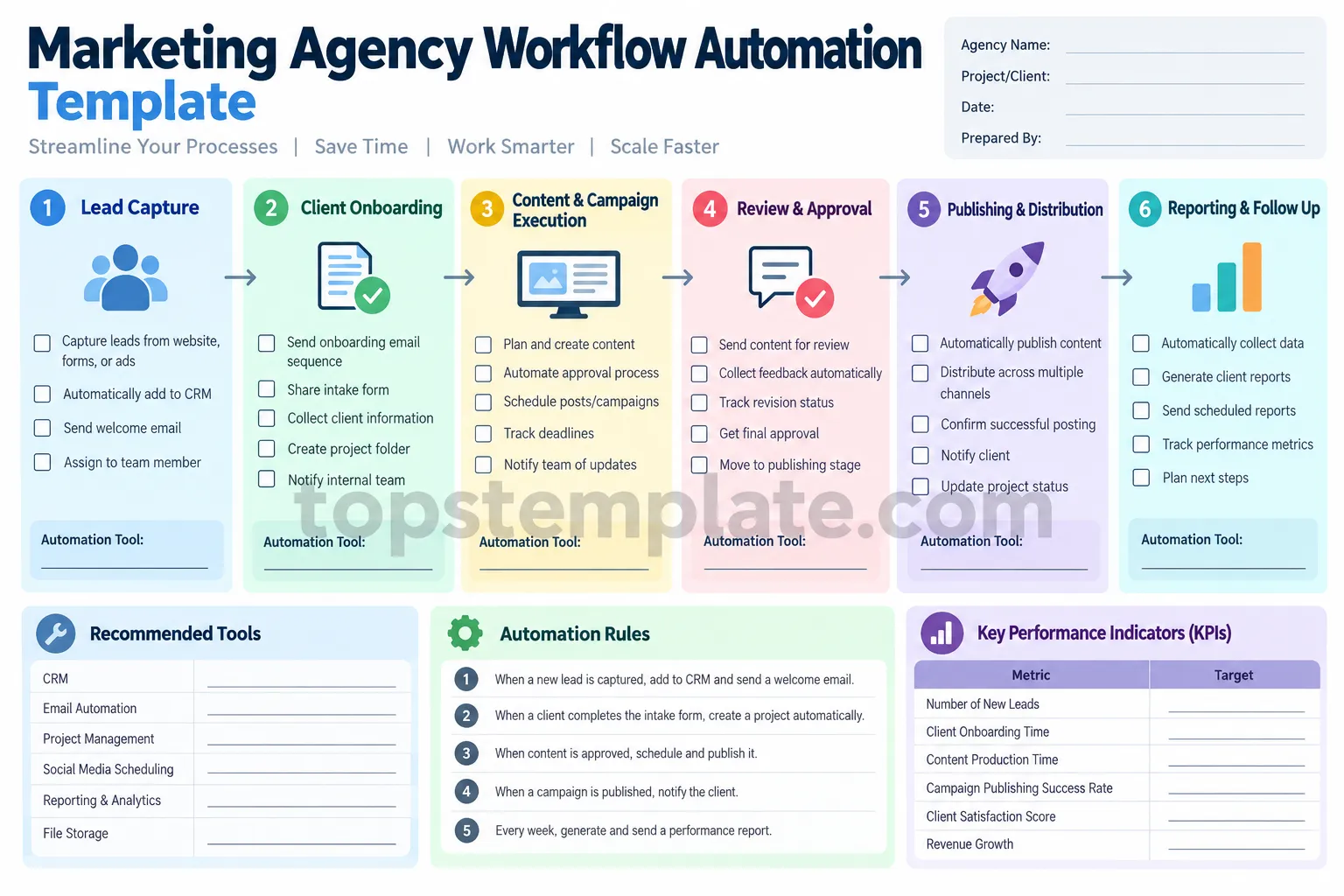
A practical agency workflow can be divided into six connected stages: lead capture, client onboarding, campaign execution, review and approval, publishing, and reporting. Mapping these stages before choosing automation tools makes it easier to identify where automation will provide the most value.
Use the following template as a starting point for designing your own agency process.
How to Build an Automated Marketing Agency Workflow
1. Start With Lead Capture
The first stage is turning new inquiries into organized leads. Leads may arrive through a website form, landing page, social media campaign, email, advertising platform, or referral.
Instead of manually copying information into a CRM, create an automated trigger. When a prospect submits a form, the system can automatically create a lead record and assign it to the appropriate team member.
A simple lead workflow might include:
- Capture contact information
- Create a CRM record
- Identify the lead source
- Assign an owner
- Send a confirmation email
- Create a follow-up task
- Notify the sales or account team
2. Automate Client Onboarding
Once a prospect becomes a client, onboarding should follow a standardized process. This prevents account managers from rebuilding the same checklist for every new project.
An automated onboarding workflow can create a project from a predefined template, send an intake form, create a shared folder, assign internal responsibilities, and schedule important kickoff tasks.
For example, when a signed agreement is recorded, the system can create a client workspace and automatically assign tasks to the strategist, designer, copywriter, and account manager.
3. Connect Content Production to Project Management
Content production is often one of the busiest parts of agency operations. Blog posts, advertisements, social media content, email campaigns, graphics, and videos may all require multiple stages of work.
Automation can help move each content item through a predefined workflow. A typical sequence could be:
- Content brief created
- Writer or designer assigned
- Draft completed
- Internal review
- Client review
- Revision requested if necessary
- Final approval
- Scheduled for publication
- Published
Automated notifications can alert the next person when an item changes status. This reduces the need for manual messages such as “The draft is ready for review.”
4. Automate Review and Approval
Client approvals can become a bottleneck when they depend entirely on manual follow-ups. A structured approval workflow makes the process easier to manage.
When content reaches the approval stage, the client can receive a notification or review request. If feedback is submitted, the relevant team member can be notified automatically. Once approval is recorded, the content can move to the publishing stage.
For agencies managing many clients, this type of workflow can make approval status much easier to track.
5. Automate Publishing and Distribution
Once content has been approved, automation can help prepare it for distribution. Social media posts, email campaigns, blog content, and other digital assets can be scheduled according to the campaign plan.
Automation can also trigger internal notifications after publication. For example, an account manager could receive a message confirming that a campaign has been published and that the reporting workflow can begin.
6. Automate Reporting and Follow-Up
Reporting is another area where agencies can save significant administrative time. Instead of manually collecting the same metrics every week or month, reporting workflows can gather information from connected marketing platforms and organize it into a recurring report.
Depending on the agency’s setup, automated reports may include traffic, leads, engagement, conversion rates, campaign performance, and other agreed-upon KPIs.
After a report is delivered, a follow-up task can automatically remind the account team to review results and discuss next steps with the client.
Best Processes to Automate First
Not every agency process needs automation immediately. Start with repetitive tasks that happen frequently and have clear rules.
Good candidates include:
- New lead notifications
- CRM data entry
- Welcome emails
- Client onboarding checklists
- Recurring task creation
- Approval reminders
- Internal status notifications
- Content scheduling
- Recurring performance reports
- Client follow-up reminders
Processes that require creative judgment, strategic decisions, or sensitive client communication should generally retain meaningful human involvement.
Choosing Tools for Marketing Workflow Automation
The best automation system does not necessarily require dozens of applications. In many cases, a small collection of well-connected tools is easier to manage.
A typical marketing agency technology stack may include a CRM, project management platform, email marketing system, cloud storage, social media scheduling tool, analytics platform, and automation platform.
When evaluating tools, consider:
- Integration options
- Ease of setup and maintenance
- Workflow triggers and actions
- Team permissions
- Reporting capabilities
- Scalability
- Data security
- Cost per user or workflow
The most important factor is not the number of features. It is whether the tools can support the actual processes your agency uses every day.
Common Marketing Automation Mistakes
Automating a Bad Process
Automation does not automatically improve a workflow. If the existing process is confusing or unnecessarily complicated, automation can simply make the confusion happen faster.
Document and simplify the process before automating it.
Creating Too Many Notifications
Notifications are useful until team members receive so many that important messages become easy to ignore. Only automate notifications that require action or provide meaningful information.
Ignoring Exceptions
Real agency projects rarely follow exactly the same path every time. A workflow should include ways to handle revisions, delayed approvals, urgent requests, or unusual client requirements.
Failing to Review Automations
Automation should be maintained like any other business process. Review workflows periodically to remove outdated steps, update integrations, and confirm that automated actions are still producing the intended results.
Tips for Scaling Agency Workflow Automation
As an agency grows, workflow automation becomes more valuable when it is standardized. Create reusable templates for common client types, campaign types, and services.
For example, an agency offering SEO services could create a standard workflow covering keyword research, content planning, production, optimization, approval, publishing, and monthly reporting.
Similarly, a social media agency could create a recurring workflow for content planning, creative production, client approval, scheduling, publication, engagement monitoring, and reporting.
Document the purpose of each automation and identify its owner. This makes troubleshooting easier when a workflow stops working or when a connected application changes its settings.
Key Metrics to Measure Automation Success
Automation should produce measurable operational improvements. Track metrics that show whether workflows are actually helping the agency.
- Client onboarding time: Measure how long it takes to move a new client from signed agreement to active project.
- Task completion time: Compare the time required for common processes before and after automation.
- Approval turnaround: Track how quickly content moves through the client approval process.
- Workflow error rate: Monitor failed automations, missing data, and incorrect task assignments.
- Team productivity: Measure how much administrative work is reduced.
- Client satisfaction: Look for improvements in communication, transparency, and delivery consistency.
Conclusion
Marketing agency workflow automation gives agencies a practical way to reduce repetitive administrative work, improve consistency, and create scalable operating processes. From lead capture and client onboarding to content approval, publishing, and reporting, automation can connect individual tasks into a smoother end-to-end workflow.
The most effective approach is to start small. Identify repetitive processes, document the current workflow, remove unnecessary steps, and then automate the actions that follow clear rules. Keep human oversight where creativity, strategy, judgment, or client relationships are important.
With the right workflow automation strategy, a marketing agency can spend less time managing routine processes and more time delivering valuable marketing work. A well-designed automation system is not simply about saving clicks. It is about creating a reliable operational foundation that allows an agency to serve clients efficiently as it grows.
