A black and white medical template is a practical solution for creating clean, organized, and printable medical documents. Whether you need a patient information sheet, medical history form, examination record, appointment worksheet, or clinical notes template, a monochrome design can make important information easier to read and manage.
Black and white medical forms are especially useful for clinics, hospitals, healthcare professionals, students, educators, and anyone who needs a simple medical document that can be printed without relying on color ink. With clear sections, structured fields, checkboxes, and writing areas, a well-designed medical template can support efficient documentation while maintaining a professional appearance.
This guide explains how to use a black and white medical template, what sections to include, how to make printable forms more practical, and how to choose a layout that works for different healthcare documentation needs.
What Is a Black and White Medical Template?
A black and white medical template is a pre-designed document that uses primarily black, white, and grayscale elements to organize healthcare-related information. Unlike colorful medical forms, monochrome templates focus on typography, borders, spacing, icons, tables, and clearly defined sections.
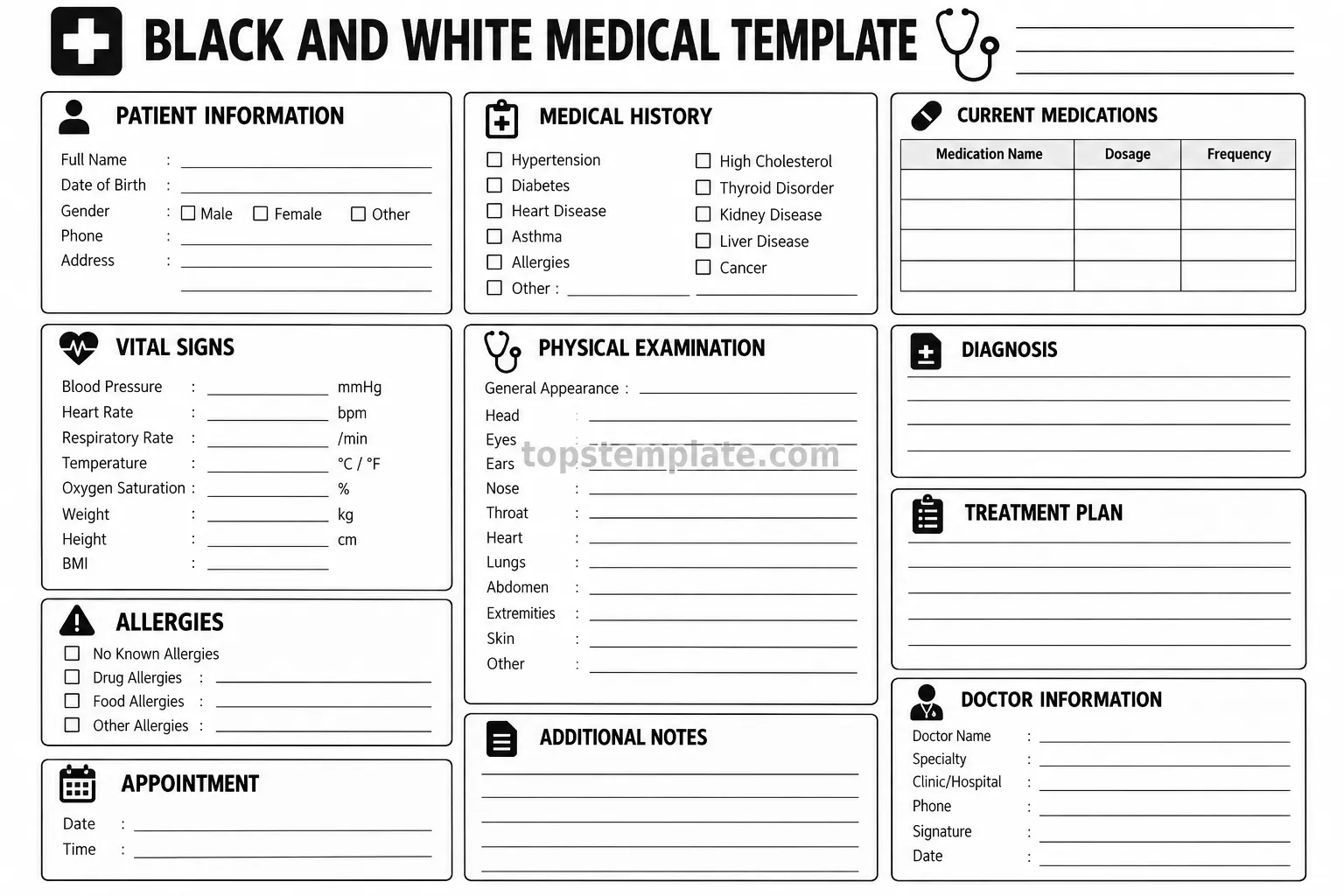
This design approach makes the document suitable for both digital use and physical printing. A good template can include areas for patient details, medical history, medications, vital signs, allergies, diagnosis notes, treatment plans, appointments, and healthcare provider information.
Because the design does not depend on multiple colors, it can remain readable when printed on standard office printers. This makes it a convenient option for routine documentation and educational activities.
Why Use a Black and White Medical Template?
There are several practical reasons to choose a monochrome medical document template. The most important benefit is simplicity. Medical information can contain many details, so a clean layout helps users focus on the content instead of decorative elements.
Easy to Print
A black and white printable medical template can be printed using standard laser or inkjet printers. It can also reduce the need for color cartridges, which may be useful when producing multiple copies for a clinic, classroom, office, or personal filing system.
Clear and Professional Appearance
Black typography and simple borders create a professional visual structure. Headings can separate different categories of information, while lines, boxes, and tables provide clear spaces for writing or entering data.
Suitable for Different Medical Documents
A flexible medical form template can be adapted for many purposes, including:
- Patient information forms
- Medical history worksheets
- Physical examination forms
- Medication tracking sheets
- Vital signs records
- Allergy information forms
- Appointment documentation
- Diagnosis and treatment notes
- Healthcare education worksheets
- Clinical documentation practice
Key Sections of a Black and White Medical Form
The best medical templates organize information into logical sections. The exact structure depends on the intended purpose, but several components are commonly useful.
Patient Information
The patient information section provides basic identifying and contact fields. Depending on the intended use and applicable privacy requirements, fields may include name, date of birth, contact information, address, and other administrative details.
Keeping these fields near the top of the document makes the form easier to identify and organize.
Medical History
A medical history section can provide checkboxes or writing areas for relevant conditions and previous health information. A structured layout can make it easier to record information consistently.
Current Medications
A medication table can provide columns for medication name, dosage, frequency, and other relevant notes. Tables are particularly useful because related information can be viewed in one place.
Vital Signs
A medical worksheet may include fields for commonly documented measurements such as blood pressure, heart rate, respiratory rate, temperature, oxygen saturation, weight, height, and BMI. These fields should be used according to appropriate clinical procedures and professional guidance.
Allergies
An allergy section can provide clearly visible checkboxes and writing lines for documenting known allergies. A prominent layout can help prevent this information from becoming difficult to locate within a larger document.
Physical Examination
A physical examination area can contain structured fields for observations. Dividing the section into categories can provide enough space for notes while keeping the overall form organized.
Diagnosis and Treatment Plan
Dedicated sections for diagnosis and treatment notes give healthcare professionals an organized place to document relevant information. These areas should be used as documentation fields rather than as a substitute for professional medical judgment.
Black and White Medical Template for Printing
Printability is one of the most important considerations when selecting a medical form. A template may look attractive on a screen but become difficult to use when printed. A well-designed printable template should maintain sufficient contrast, spacing, and writing room on paper.
Before printing multiple copies, check the document using the intended paper size and printer settings. Make sure headings, borders, tables, and writing lines remain visible and that no important content is cut off near the page margins.
For handwritten forms, leave enough blank space for users to write comfortably. Overcrowding too many fields onto one page can make even a well-organized document difficult to complete.
How to Make a Medical Template More Practical
Use Clear Section Headings
Strong section headings help users quickly locate the information they need. Use consistent typography and spacing so every section follows the same visual hierarchy.
Keep Related Information Together
Fields that belong to the same category should appear together. For example, patient contact details should not be separated across different areas of the page. Grouping related fields reduces unnecessary scanning.
Use Checkboxes Where Appropriate
Checkboxes can make repetitive selections faster and reduce the amount of writing required. They work particularly well for predefined categories, while open writing lines are better when users need to provide detailed information.
Provide Adequate Writing Space
A template should balance information density with usability. Leave sufficient room for handwritten notes, signatures, dates, and other information that may require additional space.
Maintain Strong Contrast
Black text on a white background provides a straightforward visual hierarchy. Avoid extremely thin lines or overly small text that may become difficult to read after printing or photocopying.
Digital and Printable Uses
A black and white medical template can be useful in both digital and physical workflows. A printable version can be placed in a folder or patient record system where appropriate, while a digital version can be completed electronically when the format and software support that workflow.
Educational institutions can also use simplified medical templates for classroom exercises, documentation practice, anatomy-related activities, or healthcare administration training. When used for education, clearly distinguish fictional or practice information from real patient records.
Tips for Choosing the Right Medical Template
Before downloading or creating a medical form, consider how the document will actually be used. The right template should match the workflow rather than simply contain as many fields as possible.
- Define the purpose: Decide whether the form is intended for patient intake, examination notes, education, appointments, or another task.
- Check the layout: Make sure sections follow a logical order and are easy to scan.
- Review the writing space: Ensure there is enough room for handwritten or typed information.
- Consider printing: Verify that the design works well in black and white and on your preferred paper size.
- Protect sensitive information: Follow applicable privacy, security, and record-handling requirements when working with real medical information.
- Customize carefully: Remove unnecessary fields and add only information relevant to the intended workflow.
Benefits of a Simple Medical Document Design
Simple design does not mean a document has to be basic or ineffective. In healthcare documentation, simplicity can improve usability. Consistent headings, clearly separated fields, and predictable layouts allow users to find information quickly.
A monochrome design can also be easier to reproduce through photocopying or repeated printing. This is particularly helpful for organizations that need consistent forms across different locations or workstations.
Another advantage is adaptability. A black and white template can often be customized with a clinic name, department title, additional fields, instructions, or other administrative information without requiring a complete redesign.
Best Practices for Using Medical Templates
Templates should support documentation rather than replace professional procedures. When creating or adapting a form for real healthcare use, review its fields and workflow with appropriately qualified professionals.
It is also important to consider privacy and data protection. Medical information can be sensitive, so printed forms should be stored, transferred, and disposed of according to the applicable policies and laws in the relevant setting.
For digital forms, access controls, secure storage, and appropriate handling procedures may also be necessary. A visually attractive template should never be treated as a substitute for proper information security.
Conclusion
A black and white medical template provides a clean, practical, and printable way to organize healthcare-related information. By combining clear headings, structured fields, checkboxes, tables, and adequate writing space, a monochrome medical form can support a wide range of documentation and educational needs.
When choosing or creating a template, focus on its intended purpose, readability, print quality, organization, and privacy requirements. A simple design with a logical structure can make medical documentation easier to complete, review, and maintain.
Whether you need a patient information worksheet, medical history form, examination record, medication table, or general healthcare document, a well-structured black and white layout offers a versatile starting point that can be adapted to your specific needs.
